How to find that sqlite file behind your CoreData

This is a quick thing. Hard to find unless you know where to look. When running a CoreData driven app, there are times when you’d like to just rest your data store and start again. Doing a schema change is one such case. Of course if you’re doing something really silly and mess up the data, again.. reset!

So, to do that, simply delete the .sqlite file for your app. Running in the simulator, that is stored in your home directory under ~/Library/Application Support/iPhone Simulator/User/Applications/<special app id>/Documents/<appname>.sqlite

Easy, huh? Deleting this is sure nicer than clearing all apps and data from the simulator.

WWDC09 Keynote

I got up before 6am and got into the line about 6:40. By then, I was #722. I heard the first person in line got there at 5:30pm the yesterday! That’s hard core! I might have broken the 700 barrier if I hadn’t stopped at Starbucks to get oatmeal and a frappuccino. I’m pretty sure I saw Peter Ha from CrunchGear getting into line after me! You can see from the pictures below, how long the lines were and how packed in we were while waiting inside for the 3rd floor to open up.

A great summary of the keynote is posted on Engadget as well, so I won’t try to duplicate that.

Amazon CloudWatch with Java/typica

Recently, Amazon announced that it’s CloudWatch service went into public beta. I’ve been involved with the private beta of this and the Elastic Load Balancing and Auto Scaling services. I’ve just completed testing of the CloudWatch monitoring service APIs in typica and thought I’d share some of what has been added.

First of all, the Jec2 class has 2 new methods, monitorInstances(..) and unmonitorInstances(..). They do exactly what you’d expect by turning monitoring on or off for one or more instances. What I think more people will use is the new flag on LaunchConfiguration to enable monitoring when you launch an instance. Also, if you describe instances, you’ll get the monitoring status back now also.

The real CloudWatch APIs are in their own package. I did this because it seems like while they are initially released for EC2, they are written to allow monitoring other service also (hence the namespace parameter). The new API has only two methods. The first lets you list the metrics you can query in the second call. To do this, you can use some code like this;

Monitoring mon = new Monitoring(props.getProperty(“aws.accessId”), props.getProperty(“aws.secretKey”));
List<Metric> metrix = mon.listMetrics();
for (Metric m : metrix) {
System.out.println(“name = “+m.getName()+”:”+m.getNamespace());
for (Dimension dim : m.getDimensions()) {
System.out.println(”   “+dim.getName()+”: “+dim.getValue());
}
}
Monitoring mon = new Monitoring(accessId, secretKey);
List<Metric> metrix = mon.listMetrics();
for (Metric m : metrix) {
	System.out.println("name = "+m.getName()+":"+m.getNamespace());
	for (Dimension dim : m.getDimensions()) {
		System.out.println("   "+dim.getName()+": "+dim.getValue());
	}
}
Here is some of the output (trucated because there is a lot more);
     [java] name = NetworkIn:AWS/EC2
     [java] name = NetworkOut:AWS/EC2
     [java]    ImageId: ami-85d037ec
     [java] name = NetworkOut:AWS/EC2
     [java] name = DiskWriteBytes:AWS/EC2
     [java]    InstanceType: m1.small
     [java] name = CPUUtilization:AWS/EC2
     [java]    InstanceType: m1.large
     [java] name = DiskWriteBytes:AWS/EC2
     [java]    InstanceType: m1.large
     [java] name = DiskReadOps:AWS/EC2
     [java]    InstanceId: i-1de3a674
     [java] name = DiskWriteOps:AWS/EC2
     [java]    InstanceType: m1.small
     [java] name = DiskReadOps:AWS/EC2
     [java]    ImageId: ami-24fa86b
     [java] name = DiskReadOps:AWS/EC2
     [java]    InstanceId: i-51423838

Once you have an instance or an image you’d like to monitor, you can use some code like this to fetch the data;

List<Statistics> stats = new ArrayList<Statistics>();
stats.add(Statistics.AVERAGE);

Map<String, String> dimensions = new HashMap<String, String>();
// can be InstanceId, InstanceType, ImageId
dimensions.put("ImageId", "ami-85d037ec");

Date end = new Date();	// that means now
end = new Date(end.getTime() + 3600000*5); // need to adjust for GMT
Date start = new Date(end.getTime() - 3600000*24);	// 1 days ago
MetricStatisticsResult result = mon.getMetricStatistics(
				60,	// must be multiple of 60
				stats,	// see above
				"AWS/EC2",
				dimensions,
				start,	// start of interval
				end,	// end of interval
				// can be NetworkIn, NetworkOut, DiskReadOps,
				// DiskWriteOps, DiskReadBytes, DiskWriteBytes,
				// CPUUtilization
				"CPUUtilization",
				StandardUnit.PERCENT,
				null);
System.out.println("metrics label = "+result.getLabel());
for (Datapoint dp : result.getDatapoints()) {
	System.out.println(dp.getTimestamp().getTime().toString()+
			" samples:"+dp.getSamples()+" "+dp.getAverage()+" "+dp.getUnit());
}
It can be useful monitor by ImageId when you’re running a pool of servers (like with the auto scaling service). I’ve tried to include comments within the code that indicate appropriate values because it can get complicated..
     [java] metrics label = CPUUtilization
     [java] Fri May 22 10:56:00 EDT 2009 samples:1.0 0.0 Percent
     [java] Fri May 22 11:42:00 EDT 2009 samples:1.0 0.0 Percent
     [java] Fri May 22 12:55:00 EDT 2009 samples:1.0 1.54 Percent
     [java] Fri May 22 12:41:00 EDT 2009 samples:1.0 0.0 Percent
     [java] Fri May 22 13:10:00 EDT 2009 samples:1.0 0.0 Percent
     [java] Fri May 22 10:09:00 EDT 2009 samples:1.0 0.0 Percent
     [java] Fri May 22 12:51:00 EDT 2009 samples:1.0 0.0 Percent
     [java] Fri May 22 12:40:00 EDT 2009 samples:1.0 0.0 Percent
     [java] Fri May 22 10:07:00 EDT 2009 samples:1.0 0.0 Percent
     [java] Fri May 22 13:41:00 EDT 2009 samples:1.0 0.0 Percent
     [java] Fri May 22 10:34:00 EDT 2009 samples:1.0 0.0 Percent
     [java] Fri May 22 12:01:00 EDT 2009 samples:1.0 0.0 Percent
     [java] Fri May 22 10:17:00 EDT 2009 samples:1.0 0.39 Percent
     [java] Fri May 22 11:39:00 EDT 2009 samples:1.0 1.15 Percent
     [java] Fri May 22 10:06:00 EDT 2009 samples:1.0 0.38 Percent
     [java] Fri May 22 12:10:00 EDT 2009 samples:1.0 0.0 Percent
     [java] Fri May 22 12:09:00 EDT 2009 samples:1.0 0.76 Percent
     [java] Fri May 22 13:46:00 EDT 2009 samples:1.0 0.0 Percent
     [java] Fri May 22 10:39:00 EDT 2009 samples:1.0 0.0 Percent
     [java] Fri May 22 12:11:00 EDT 2009 samples:1.0 0.0 Percent
     [java] Fri May 22 12:03:00 EDT 2009 samples:1.0 1.15 Percent
     [java] Fri May 22 11:32:00 EDT 2009 samples:1.0 0.0 Percent
     [java] Fri May 22 10:44:00 EDT 2009 samples:1.0 0.0 Percent
     [java] Fri May 22 12:45:00 EDT 2009 samples:1.0 0.0 Percent
This code is available in typica SVN as of r265. Look for typica release 1.6 which will contain CloudWatch, ElasticLoadBalancing and AutoScaling once a little more testing has been completed.


Finding freed/deallocated instances of objects

This procedure has saved me more than once, so I need to document it throughly for everyone! There are cases where I see messages (in the debugger console) that are like this;

-[NSFetchedResultsController class]: message sent to deallocated instance 0x11957d0

Sometimes, it will talk about “freed” instead of deallocated. That address at the end is important. To track down the line of code where the object was allocated, you’ll need to set a couple environment settings. To do this, right click on the executable you’re trying to debug and select “get info”. Select the “arguments” tag and set the values shown below;


debug environment settings

debug environment settings

(be sure to disable these when you’re done. They should not be enabled for a production build!)

Next, run your program and test enough to generate the error. In the Debugger Console, copy that hex address value, then type the command;

(gdb) info malloc-history <paste-address-here>


You should see something like this;


Stack – pthread: 0xa0416720 number of frames: 28

    0: 0x9264382d in malloc_zone_calloc

    1: 0x92643782 in calloc

    2: 0x93611618 in _internal_class_createInstanceFromZone

    3: 0x9361ab08 in _internal_class_createInstance

    4: 0x3020275c in +[NSObject allocWithZone:]

    5: 0x3020264a in +[NSObject alloc]

    6: 0x3d92 in -[AMRAPViewController fetchedResultsController] at /Users/dkavanagh/CrossFit Timer/Classes/AMRAPViewController.m:146

    7: 0x3a18 in -[AMRAPViewController viewWillAppear:] at /Users/dkavanagh/CrossFit Timer/Classes/AMRAPViewController.m:96

    8: 0x3097c945 in -[UINavigationController _startTransition:fromViewController:toViewController:]

    9: 0x30977c33 in -[UINavigationController _startDeferredTransitionIfNeeded]

   10: 0x3097d01e in -[UINavigationController pushViewController:transition:forceImmediate:]

The first line below the object alloc (in my case, line 6) will show where the offending object was allocated and should really help in tracking down the free/dealloc problem.

The original solution was posted in the app dev forums. You’ll need a login to see this.

Simple UIViewController Management

I’m writing a navigation based application for the iPhone and need to instantiate the same UIViewController (for a screen) in more than one place. In some sample code I’ve seen, local copies are kept in an NSArray. I’ve been doing that myself until I decided the Factory design pattern was probably more useful. I wrote the code below and it has been working very well.

#import <Foundation/Foundation.h>
@interface ControllerManager : NSObject {
NSMutableDictionary *controllers;
}
+ (ControllerManager *)controllerManager;
– (UIViewController *)controllerByName:(NSString *)name;
@end
#import <Foundation/Foundation.h>

@interface ControllerManager : NSObject {
	NSMutableDictionary *controllers;
}

+ (ControllerManager *)controllerManager;
- (UIViewController *)controllerByName:(NSString *)name;
@end

@implementation ControllerManager

+ (ControllerManager *)controllerManager {
	static ControllerManager *sharedInstance;
	@synchronized(self) {
		if (!sharedInstance) {
			sharedInstance = [ControllerManager alloc];
		}
	}
	return sharedInstance;
}

- (UIViewController *)controllerByName:(NSString *)name {
	if (controllers == nil) {
		controllers = [[NSMutableDictionary alloc] initWithCapacity:5];
	}
	UIViewController *ret = [controllers objectForKey:name];
	if (ret == nil) {
		Class cls = NSClassFromString(name);
		ret = [cls alloc];
		[ret initWithNibName:name bundle:nil];
		[controllers setObject:ret forKey:name];
	}
	return ret;
}

@end

If you’d like to push another view controller, do something like this;

[[self navigationController] pushViewController:[[ControllerManager controllerManager controllerByName:@"MyViewController"] animated:YES];

The first time the view loads, it is initialized from the nib. The nib must be named the same as the view controller, which by the examples I’ve seen is fairly common anyway. The view is then stored in the ControllerManager and served up as a singleton. Since you can write your view to load data before it is viewed, this pattern works well and saves memory by not allowing multiple copies of the views/controllers.

directEC2 is available in the AppStore

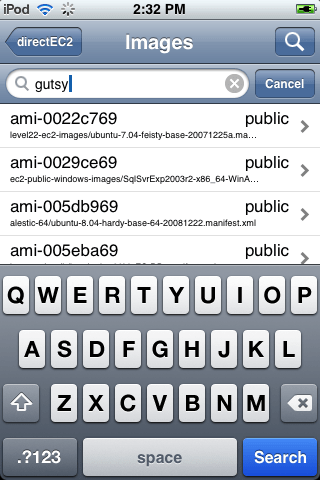
I’m pleased to announce that the application I wrote to manage Amazon EC2 instances from an iPhone or iPod touch is now in the AppStore. This application is the first version of what will become a very feature rich management console. Here is a quick run-down of the features;

  • Manage images, instances, volumes, snapshots and more.
  • Maintain launch configurations to quickly spin up more servers
  • Check server status, console output
  • Multiple account support
  • Access all regions
  • Create, attach volumes
  • Backup and restore with snapshots
  • Shake navigation aid
That last item is something I came up with to solve the problem of being several levels deep in the application navigation. To simplify returning to the top level, the application responds to shake and resets the navigation. This turns out to be pretty handy and I hope other applications adopt this feature.
Get the app here: iTunes App Store
Here are some screenshots to entice you;
img_0020img_0009img_0010img_0008img_0011

Query Tool for Amazon SimpleDB

Although these projects are never really finished, I can say I’ve completed version 1 of the Amazon SimpleDB Query Tool. This is built on top of a new SimpleDB API that will be part of an upcoming typica release. The code currently resides in a branch, but will hopefully get merges into trunk in the next few weeks.

OK, more about the tool. It was built to provide a convenient way to test queries. That’s it. Towards that end, there is a list of features I included that really met a need for me.

  • flexible query workspace (scratch pad)
  • run query on the line where the cursor is
  • allow domain selection via the UI
  • display domain metadata
  • show results from several queries at once
  • show box usage and other stats

Now, the moment you’ve all been waiting for, a screenshot!

querytool

Right now, the code is still in SVN, so if you’d like to run it, you’ll need to check out the branch and build it.  If you get that far, to run it, you can use this command, “ant test.main -Dclass=QueryTool -Dargs=”<access id> <secret key>”

For an official release, I’ll make an executable jar, so you’d run “java -jar QueryTool.jar <access id> <secret key>”

iPhone ushers us back to heavy-weight apps

OK, if you can call an iPhone app, heavy weight… Just when you thought the rest of the cool apps would all run in a browser, here comes the iPhone. Before this, I thought mobile apps were pretty silly and too much of a pain to distribute. I tried my hand at J2ME, but the carriers have distribution of those really locked down and it is hard for anyone at a grass roots level to get a J2ME app distributed. All of the cool features require special signing certificates that are very carrier specific. (damn you, mobile carriers!!)
In comes the iPhone. Here is a mobile platform that offers a very consistent set of features and has a very large installed base. It has a huge cool factor (yes, even this long after it originally launched). The app store really changed the model for distributing mobile applications. Now, anyone (given a $99 entry fee) can become an iPhone developer. OK, I’m hearing people say $99 isn’t all, because you need to invest at least $1400 (rough figure) for a development box and device. This is exactly what I started with, and 20″ iMac and iPod touch. OK, but you don’t have to be anyone special to sign up, that’s the point. Anyone with about 1500 bucks and a little skill, creativity and ambition can become an iPhone developer. By all accounts, a lot of people have! 800 million app downloads to 30 million devices and 25,000 apps available in the app store! Holy cow! Now, that’s a markeplace! Developers keep 70% of the revenue. Good for Apple, good for us.
Today, I was watching a video on crunchgear about the NIN iPhone app and think this really drives home something I’ve been thinking about for a while. People don’t bother doing a really nice web app that runs on the iPhone, they write an iPhone app specifically for their service/movie/band, whatever. I recommend watching the video, just to see the really excellent integration of features on the iPhone and then in their regular web site. Very cool stuff!
I wonder, did the lack of Flash on the iPhone help boost iPhone apps? I certainly didn’t hurt. With Flash, there are a lot of developers who would have been ready to build apps sized for the iPhone. There would have been some really nifty, media-heavy/interactive apps built and deployed over the web (no need for the app store). The one thing that would have been missing is the tight integration with iPhone OS features. Things like geo-location, access to camera/photos/music, accelerometer, etc. I think Flash would have meant fewer native iPhone apps, but the native apps would have been built anyway.
I say, welcome back to the client applications! With a well-managed distribution/update system in place, client apps can be managed very easily. The app store does that reasonably well. I just hope I can build the next iShoot!