Amazon SQS adds new features

I haven’t seen this documented anywhere yet, but I got the following e-mail from Amazon;

Dear Amazon SQS Customer,

Today, we’ve augmented Amazon SQS with support for several new message attributes.

Amazon SQS now supports a new value – ApproximateNumberOfMessagesNotVisible – for the GetQueueAttributes’ AttributeName parameter. Calling GetQueueAttributes with this value will return the approximate number of messages that are not timed out and not deleted.

In addition, we’ve added new attributes supported by the ReceiveMessage API. ReceiveMessage’s AttributeName parameter list now includes three additional values – All, ApproximateReceiveCount, and ApproximateFirstReceiveTimestamp – which will allow you to receive additional message information as part of the call.

These new features are available with Amazon SQS WSDL 2009-02-01. If you’d like to take advantage of these new features, please review our Technical Documentation, which gives detailed information about the new APIs. Or refer to the What’s New post on the SQS Developer Guide.

Lastly, we’d like to provide an update on the “end-of-life” schedule for WSDL versions 2006-04-01 and 2007-05-01. As previously communicated, Amazon SQS users will have until November 6, 2009 to complete their migration to WSDL version 2009-02-01 or 2008-01-01, after which the old WSDL versions will no longer be available. We’ve provided some migration resources that will assist you in moving to the new WSDL.

We hope you enjoy these new features.

Sincerely,

The Amazon SQS Team

QueryTool 1.1, even more to like!

Screen shot 2009-08-05 at 4.29.39 PM

A number of you have requested some new features, and some of them have made it into this new release. You can now add and delete domains from within the tool. Also, clicking on results lets you copy the cell or row into the clipboard. This later feature can be really handy for putting item names into queries. So, check it out! Once you download the jar, you run it by using this command;

java -jar QueryTool1.1.jar <accessId> <secretKey>

Amazon CloudWatch with Java/typica

Recently, Amazon announced that it’s CloudWatch service went into public beta. I’ve been involved with the private beta of this and the Elastic Load Balancing and Auto Scaling services. I’ve just completed testing of the CloudWatch monitoring service APIs in typica and thought I’d share some of what has been added.

First of all, the Jec2 class has 2 new methods, monitorInstances(..) and unmonitorInstances(..). They do exactly what you’d expect by turning monitoring on or off for one or more instances. What I think more people will use is the new flag on LaunchConfiguration to enable monitoring when you launch an instance. Also, if you describe instances, you’ll get the monitoring status back now also.

The real CloudWatch APIs are in their own package. I did this because it seems like while they are initially released for EC2, they are written to allow monitoring other service also (hence the namespace parameter). The new API has only two methods. The first lets you list the metrics you can query in the second call. To do this, you can use some code like this;

Monitoring mon = new Monitoring(props.getProperty(“aws.accessId”), props.getProperty(“aws.secretKey”));
List<Metric> metrix = mon.listMetrics();
for (Metric m : metrix) {
System.out.println(“name = “+m.getName()+”:”+m.getNamespace());
for (Dimension dim : m.getDimensions()) {
System.out.println(”   “+dim.getName()+”: “+dim.getValue());
}
}
Monitoring mon = new Monitoring(accessId, secretKey);
List<Metric> metrix = mon.listMetrics();
for (Metric m : metrix) {
	System.out.println("name = "+m.getName()+":"+m.getNamespace());
	for (Dimension dim : m.getDimensions()) {
		System.out.println("   "+dim.getName()+": "+dim.getValue());
	}
}
Here is some of the output (trucated because there is a lot more);
     [java] name = NetworkIn:AWS/EC2
     [java] name = NetworkOut:AWS/EC2
     [java]    ImageId: ami-85d037ec
     [java] name = NetworkOut:AWS/EC2
     [java] name = DiskWriteBytes:AWS/EC2
     [java]    InstanceType: m1.small
     [java] name = CPUUtilization:AWS/EC2
     [java]    InstanceType: m1.large
     [java] name = DiskWriteBytes:AWS/EC2
     [java]    InstanceType: m1.large
     [java] name = DiskReadOps:AWS/EC2
     [java]    InstanceId: i-1de3a674
     [java] name = DiskWriteOps:AWS/EC2
     [java]    InstanceType: m1.small
     [java] name = DiskReadOps:AWS/EC2
     [java]    ImageId: ami-24fa86b
     [java] name = DiskReadOps:AWS/EC2
     [java]    InstanceId: i-51423838

Once you have an instance or an image you’d like to monitor, you can use some code like this to fetch the data;

List<Statistics> stats = new ArrayList<Statistics>();
stats.add(Statistics.AVERAGE);

Map<String, String> dimensions = new HashMap<String, String>();
// can be InstanceId, InstanceType, ImageId
dimensions.put("ImageId", "ami-85d037ec");

Date end = new Date();	// that means now
end = new Date(end.getTime() + 3600000*5); // need to adjust for GMT
Date start = new Date(end.getTime() - 3600000*24);	// 1 days ago
MetricStatisticsResult result = mon.getMetricStatistics(
				60,	// must be multiple of 60
				stats,	// see above
				"AWS/EC2",
				dimensions,
				start,	// start of interval
				end,	// end of interval
				// can be NetworkIn, NetworkOut, DiskReadOps,
				// DiskWriteOps, DiskReadBytes, DiskWriteBytes,
				// CPUUtilization
				"CPUUtilization",
				StandardUnit.PERCENT,
				null);
System.out.println("metrics label = "+result.getLabel());
for (Datapoint dp : result.getDatapoints()) {
	System.out.println(dp.getTimestamp().getTime().toString()+
			" samples:"+dp.getSamples()+" "+dp.getAverage()+" "+dp.getUnit());
}
It can be useful monitor by ImageId when you’re running a pool of servers (like with the auto scaling service). I’ve tried to include comments within the code that indicate appropriate values because it can get complicated..
     [java] metrics label = CPUUtilization
     [java] Fri May 22 10:56:00 EDT 2009 samples:1.0 0.0 Percent
     [java] Fri May 22 11:42:00 EDT 2009 samples:1.0 0.0 Percent
     [java] Fri May 22 12:55:00 EDT 2009 samples:1.0 1.54 Percent
     [java] Fri May 22 12:41:00 EDT 2009 samples:1.0 0.0 Percent
     [java] Fri May 22 13:10:00 EDT 2009 samples:1.0 0.0 Percent
     [java] Fri May 22 10:09:00 EDT 2009 samples:1.0 0.0 Percent
     [java] Fri May 22 12:51:00 EDT 2009 samples:1.0 0.0 Percent
     [java] Fri May 22 12:40:00 EDT 2009 samples:1.0 0.0 Percent
     [java] Fri May 22 10:07:00 EDT 2009 samples:1.0 0.0 Percent
     [java] Fri May 22 13:41:00 EDT 2009 samples:1.0 0.0 Percent
     [java] Fri May 22 10:34:00 EDT 2009 samples:1.0 0.0 Percent
     [java] Fri May 22 12:01:00 EDT 2009 samples:1.0 0.0 Percent
     [java] Fri May 22 10:17:00 EDT 2009 samples:1.0 0.39 Percent
     [java] Fri May 22 11:39:00 EDT 2009 samples:1.0 1.15 Percent
     [java] Fri May 22 10:06:00 EDT 2009 samples:1.0 0.38 Percent
     [java] Fri May 22 12:10:00 EDT 2009 samples:1.0 0.0 Percent
     [java] Fri May 22 12:09:00 EDT 2009 samples:1.0 0.76 Percent
     [java] Fri May 22 13:46:00 EDT 2009 samples:1.0 0.0 Percent
     [java] Fri May 22 10:39:00 EDT 2009 samples:1.0 0.0 Percent
     [java] Fri May 22 12:11:00 EDT 2009 samples:1.0 0.0 Percent
     [java] Fri May 22 12:03:00 EDT 2009 samples:1.0 1.15 Percent
     [java] Fri May 22 11:32:00 EDT 2009 samples:1.0 0.0 Percent
     [java] Fri May 22 10:44:00 EDT 2009 samples:1.0 0.0 Percent
     [java] Fri May 22 12:45:00 EDT 2009 samples:1.0 0.0 Percent
This code is available in typica SVN as of r265. Look for typica release 1.6 which will contain CloudWatch, ElasticLoadBalancing and AutoScaling once a little more testing has been completed.

directEC2 is available in the AppStore

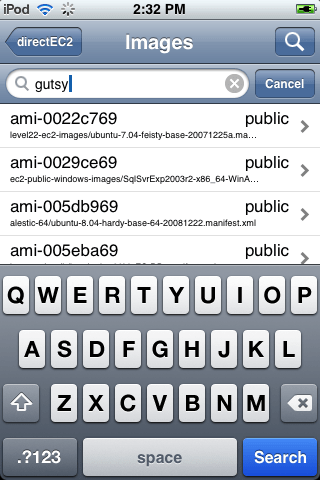
I’m pleased to announce that the application I wrote to manage Amazon EC2 instances from an iPhone or iPod touch is now in the AppStore. This application is the first version of what will become a very feature rich management console. Here is a quick run-down of the features;

  • Manage images, instances, volumes, snapshots and more.
  • Maintain launch configurations to quickly spin up more servers
  • Check server status, console output
  • Multiple account support
  • Access all regions
  • Create, attach volumes
  • Backup and restore with snapshots
  • Shake navigation aid
That last item is something I came up with to solve the problem of being several levels deep in the application navigation. To simplify returning to the top level, the application responds to shake and resets the navigation. This turns out to be pretty handy and I hope other applications adopt this feature.
Get the app here: iTunes App Store
Here are some screenshots to entice you;
img_0020img_0009img_0010img_0008img_0011

Query Tool for Amazon SimpleDB

Although these projects are never really finished, I can say I’ve completed version 1 of the Amazon SimpleDB Query Tool. This is built on top of a new SimpleDB API that will be part of an upcoming typica release. The code currently resides in a branch, but will hopefully get merges into trunk in the next few weeks.

OK, more about the tool. It was built to provide a convenient way to test queries. That’s it. Towards that end, there is a list of features I included that really met a need for me.

  • flexible query workspace (scratch pad)
  • run query on the line where the cursor is
  • allow domain selection via the UI
  • display domain metadata
  • show results from several queries at once
  • show box usage and other stats

Now, the moment you’ve all been waiting for, a screenshot!

querytool

Right now, the code is still in SVN, so if you’d like to run it, you’ll need to check out the branch and build it.  If you get that far, to run it, you can use this command, “ant test.main -Dclass=QueryTool -Dargs=”<access id> <secret key>”

For an official release, I’ll make an executable jar, so you’d run “java -jar QueryTool.jar <access id> <secret key>”

Amazon announces Elastic MapReduce

I think this slipped out a day early, but here is what came across in the DevPay documentation;

On April 2, 2009, AWS announced the release of Amazon Elastic MapReduce, a web service that enables businesses, researchers, data analysts, and developers to easily and cost-effectively process vast amounts of data. It utilizes a hosted Hadoop framework running on the web-scale infrastructure of Amazon EC2 and Amazon S3. For more information, go to http://aws.amazon.com/elasticmapreduce.

Here is the link to the official docs: http://aws.amazon.com/elasticmapreduce

Amazon Elastic MapReduce is a web service that enables businesses, researchers, data analysts, and developers to easily and cost-effectively process vast amounts of data. It utilizes a hosted Hadoop framework running on the web-scale infrastructure of Amazon Elastic Compute Cloud (Amazon EC2) and Amazon Simple Storage Service (Amazon S3).

Using Amazon Elastic MapReduce, you can instantly provision as much or as little capacity as you like to perform data-intensive tasks for applications such as web indexing, data mining, log file analysis, machine learning, financial analysis, scientific simulation, and bioinformatics research. Amazon Elastic MapReduce lets you focus on crunching or analyzing your data without having to worry about time-consuming set-up, management or tuning of Hadoop clusters or the compute capacity upon which they sit.

I do wonder if they’re trying to move up the food chain a bit much. With this service, it is clear that they are walking over some people who have set up a business doing this for customers already. It feels l bit like what Microsoft used to do. They had special knowledge and APIs into the guts of the OS and could so things better than the competition once they decided to go there. Similar things could happen here. I feel better about Amazon in general, but it is a slippery slope!